Email for AI agents.
Email for AI agents. Your AI agents can send email, manage domains, and check delivery status - no SDK needed. One URL, one API key, 20 tools.
How it works
Three steps. No code. No SDK. Just a config file edit.
Get an API key
Sign up free and copy your re_live_... key. Free tier works.
Paste the MCP config
Edit your AI client's MCP config. One URL, one Authorization header.
{ "mcpServers": { "sparked-mail": { "url": "https://mail.sparked.network/mcp", "headers": { "Authorization": "Bearer re_live_xxx" } } } }Ask your agent
Your agent now knows how to send email and manage domains.
"Send Alice a welcome email from noreply@acme.com"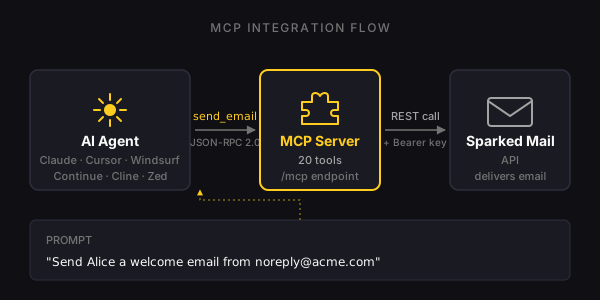
What your agent can do
Six example prompts. Each one is a few tool calls the AI figures out on its own.
"Send Alice a welcome email"
Agent calls list_templates, picks "Welcome", then calls send_with_template with Alice's name. Done in two tool calls.
"Set up my domain"
Agent calls add_domain, returns TXT records, waits for you to publish DNS, then calls verify_domain.
"Did that email bounce?"
Agent calls get_message_status, reports delivery state, suggests next steps if it failed.
"Notify our server when emails bounce"
Agent calls setup_webhook with the URL you give it. Returns the HMAC secret to save on your side.
"Block this recipient"
Agent calls add_suppression with the email. Future sends to that address are blocked at the API level.
"Enable inbound replies"
Agent calls enable_inbound, returns a one-click Cloudflare Worker deploy URL for you to click.
Try it
Pick your AI client, copy the config. That's the whole integration.
// ~/Library/Application Support/Claude/claude_desktop_config.json
{
  "mcpServers": {
    "sparked-mail": {
      "url": "https://mail.sparked.network/mcp",
      "headers": {
        "Authorization": "Bearer re_live_xxx"
      }
    }
  }
}
// Settings -> MCP -> Add new MCP server
Type: http
URL: https://mail.sparked.network/mcp
Headers: Authorization: Bearer re_live_xxx
// ~/.codeium/windsurf/mcp_config.json
{
  "mcpServers": {
    "sparked-mail": {
      "serverUrl": "https://mail.sparked.network/mcp",
      "headers": {
        "Authorization": "Bearer re_live_xxx"
      }
    }
  }
}
Prefer the CLI? Claude Code users can run:
claude mcp add --transport http sparked-mail https://mail.sparked.network/mcp \
  --header "Authorization: Bearer re_live_xxx"
20 tools available
Every common email operation is a single tool call. Your agent figures out which to call.
send_emailSend a transactional email
send_with_templateSend using a stored Handlebars template
get_message_statusCheck delivery / open / click state
list_domainsList verified sending domains
add_domainAdd a new sending domain
verify_domainVerify domain via live DNS lookup
list_inboxesList allowed sender local-parts
add_inboxRegister a new sender identity
list_templatesList stored templates
create_templateCreate a Handlebars template
list_suppressionsList blocked recipients
add_suppressionBlock a recipient (unsubscribe)
remove_suppressionUnblock a recipient
get_usageCurrent rate-limit usage
list_recent_eventsRecent delivery events
setup_webhookConfigure webhook URL + secret
create_subaccountCreate a subaccount (agency)
list_api_keysList API keys on the account
enable_inboundEnable inbound (CF Email Routing)
check_spfCheck SPF record status
Safety rails
Your AI agent can't lock you out or destroy data. Destructive operations are REST-only.
Read-only auto-approve
Tools like list_domains, get_usage, list_recent_events can be auto-approved by clients - no confirmation needed.
- list_domains, list_inboxes
- get_message_status, get_usage
- list_recent_events, list_templates
- list_suppressions, list_api_keys
- check_spf
Mutations require confirm
send_email, add_domain, setup_webhook, add_suppression - clients prompt for user confirmation by default.
- send_email, send_with_template
- add_domain, verify_domain
- add_inbox, create_template
- setup_webhook, add_suppression
- remove_suppression, enable_inbound
- create_subaccount
Destructive ops blocked
Delete domain, delete template, rotate API keys, delete account - all REST-only. Agents can't accidentally destroy their own access.
- DELETE /domains/:id
- DELETE /templates/:id
- POST /api-keys/rotate
- DELETE /admin/accounts/:id
- Account deletion